Payments and collections: your bank reconciled with your invoices
Upload your bank statement and the system finds which invoice each deposit pays and which supplier each charge belongs to. You review, confirm and the payment complement is stamped in the same step.
Included in your account: 1 reconciled statement per month. Unlimited with Premium.
What is Factura Digital Payments and collections?
Payments and collections is the Factura Digital bank reconciliation module: it matches your bank statement against your issued and received invoices, proposes which invoice each deposit pays and which supplier invoice each charge settles, and tells you why. When you confirm a collection it stamps the payment complement (REP) and sends it to your customer.
- Your bank
- statement as PDF, Excel, CSV or TXT
- Checked
- the reading is checked against the balance your bank prints
- One step
- you confirm the payment and its complement is stamped
- Your call
- nothing is recorded without your click
Walk through Payments and collections, screen by screen
Real app screens with sample data; the interface is in Spanish. Use the arrows or let it play.
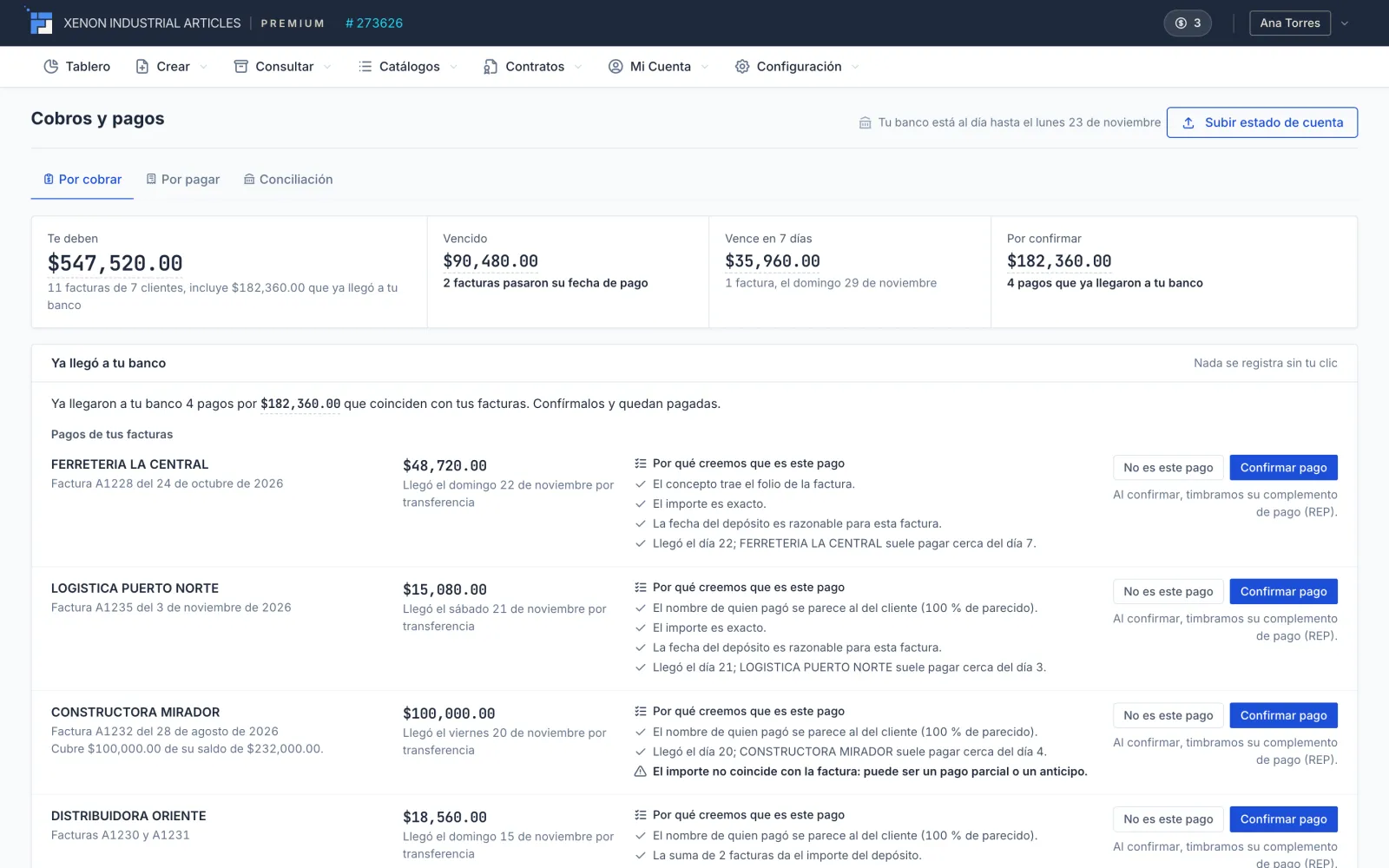
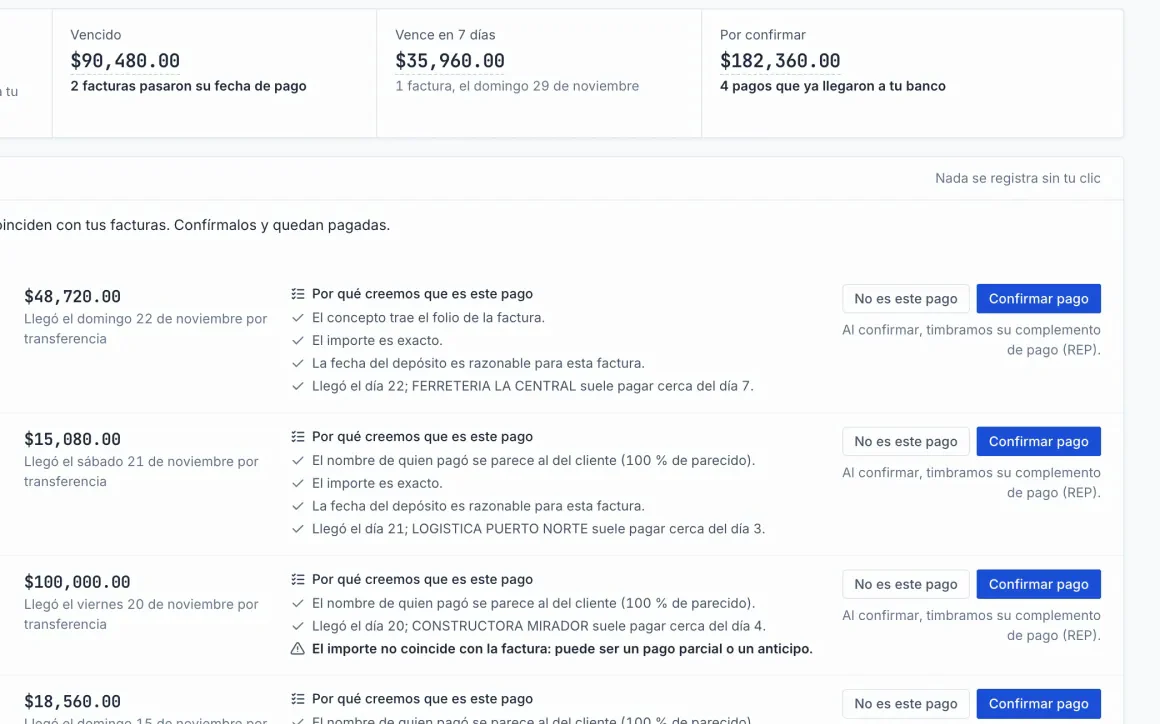
Owed to you, overdue, due in 7 days and payments already in your bank waiting to be confirmed. Only credit invoices (PPD) count.
Each deposit comes with the invoice it pays and its signals: the folio in the reference, the exact amount, the payer's name and the day that customer usually pays.
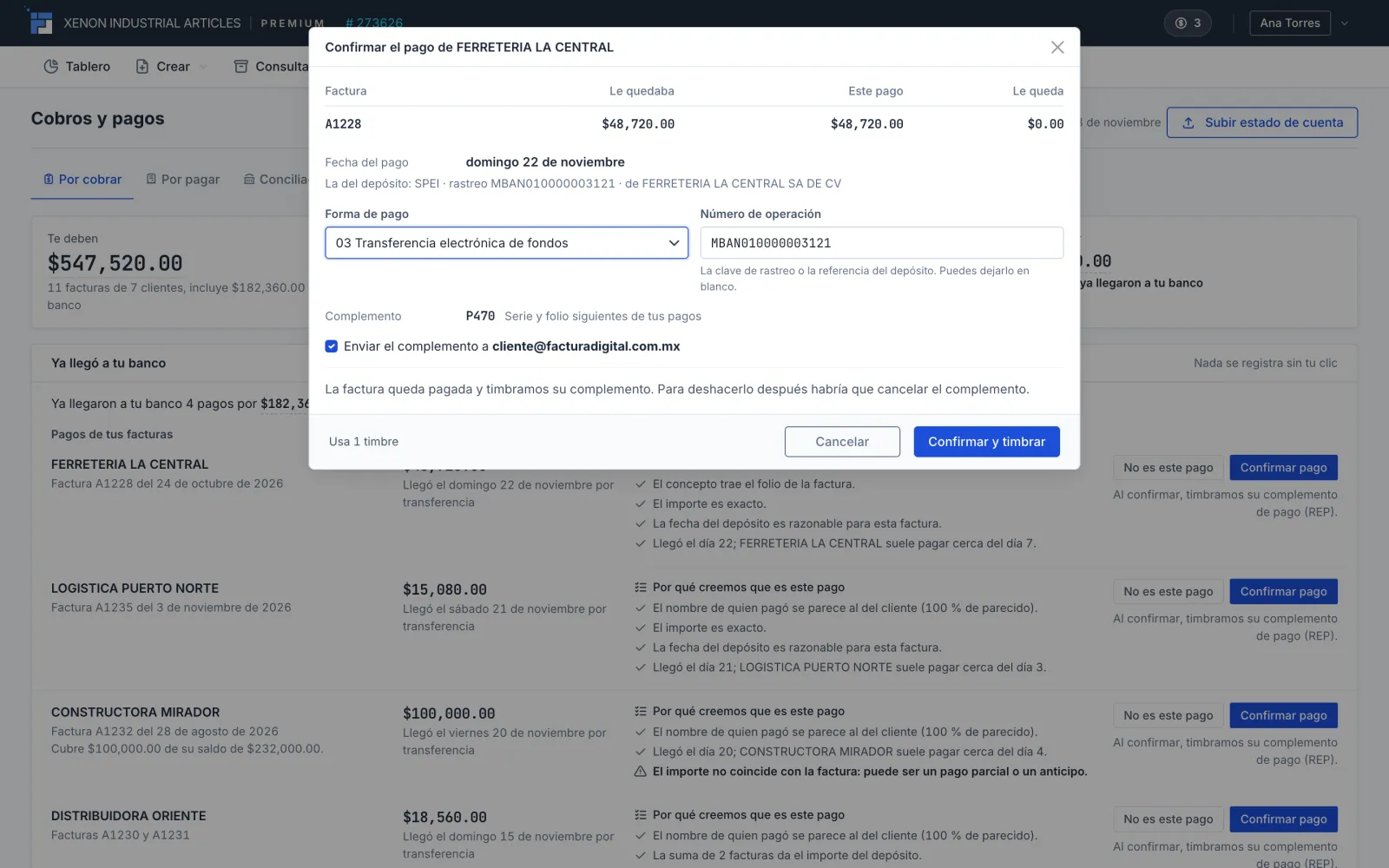
"Confirmar pago" (Confirm payment) opens a window with the previous balance, this payment and what remains. You check the payment method and transaction number, and "Confirmar y timbrar" (Confirm and stamp) records the payment and sends its REP to your customer.
When you confirm, the invoice is paid and its payment complement is stamped and sent to your customer. The confirmation message shows the series and folio of each one.
Their open invoices, their latest payments with complements and their habit: how many days they take and around which day of the month. That drives when you expect to collect.
The statement is read and checked against the bank balance. Each deposit is Ready, Review or Unmatched, and the ready ones are confirmed in bulk.
The month's reconciliation schedule with what is left to close it. One person prepares it, another reviews it, and the Excel file is ready for your accountant.
Each charge with its supplier or its explanation. If the system does not know an account, it asks whose it is: a supplier, someone paying on behalf of the company or another account of yours, and remembers it.
Owed, overdue, due this week and payments still missing their complement. Upcoming payments by date and how long you usually take to pay each supplier.
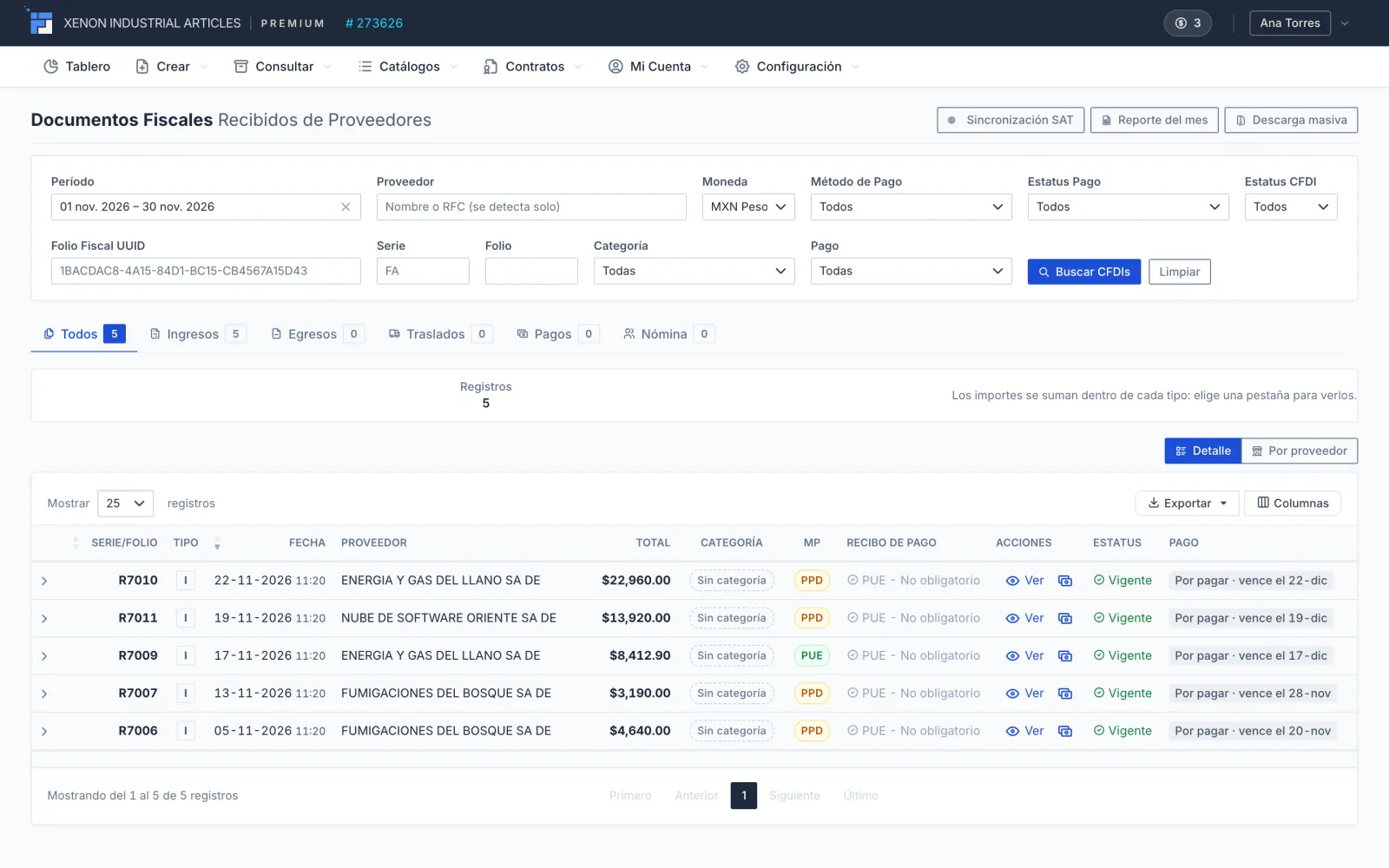
Your received invoices show the Payment column: paid on…, to pay and its due date, or paid outside the bank. Its filter shows what is still to pay.
How it works, from bank statement to stamped complement
The system does the searching and matching; you decide what gets recorded.
- 01
Upload your bank statement
As PDF, Excel, CSV or TXT, up to 20 MB, exactly as your bank provides it. It does not connect to your bank or ask for passwords.
- 02
The system reads and balances it
It extracts every deposit and charge and checks that they add up exactly to the balance your bank prints.
- 03
It proposes the invoice for each movement
It finds the issued invoice each deposit pays and the supplier invoice each charge settles, and tells you why: RFC or folio in the reference, amount, payer name, known account.
- 04
You confirm the matches
In Reconciliation you confirm which invoice each deposit belongs to: one by one or every Ready one in one click. Anything marked Review waits for your decision.
- 05
You confirm the payment and the REP is stamped
In Receivables, "Confirmar pago" (Confirm payment) opens the payment window and "Confirmar y timbrar" (Confirm and stamp) records it, stamps the complement once and sends it to your customer.
- 06
You close the month
The reconciliation schedule is prepared and reviewed, and the Excel file is ready for your accountant.
Every feature of Payments and collections
Three tabs that share the same reconciliation: Receivables, Payables and Reconciliation.
Receivables
Owed, overdue and coming due
What customers owe you on credit invoices, what is overdue, what is due in 7 days and its aging, from current to over 90 days.
Already in your bank
Deposits that match your invoices, with the reason for each proposal. Confirm them and they are paid.
When you expect to collect
A forecast by week and half-month based on how each customer has paid you.
How each customer pays you
How many days they usually take, around which day of the month, whether they group invoices and whether they include the folio. Calculated from their past payments.
Who owes you
What needs attention first: who passed their due date and who is later than usual.
Deposits without an invoice
A deposit with no invoice is marked "No es una venta" (Not a sale) or opens "Crear factura" (Create invoice) with the customer already selected.
Bank reconciliation
Reading that matches your bank
Every statement is checked against the balance the bank prints before anything is proposed.
Clear statuses
Ready, Review, Unmatched, Already recorded, Intermediary and Not a collection, each with its explanation.
Bulk confirm
Every Ready deposit in a statement in one click. Confirming only notes the match; removing a confirmation is one click.
Partial payments and several invoices
A deposit can pay part of an invoice or several at once; a deposit from several customers creates one complement per customer.
Payment gateways
Recognizes deposits from PayPal, Clip, Mercado Pago, Stripe or your bank terminal on your statement and matches them to the invoice even when the fee was already deducted.
Month-end close
Prepare, review by a second person and reopen. The Excel file has a summary, deposits, reconciling items and aging.
Supplier payments
Payables
What you owe, what is overdue, what is due this week and payments missing their complement.
What left your bank
Each charge with the supplier invoice it settles: partial payments, several invoices, US dollars and advances.
Whose account is this?
Tells a supplier apart from someone paying on behalf of the company and from your own accounts, and remembers it next time.
Paid outside the bank
Mark invoices paid in cash, by card or from another account so they no longer show as pending.
Payment status in Received
The Payment column and filter on your received CFDIs: paid, partially paid, to pay or paid per its complement.
Credit days per supplier
One rule for everyone or each supplier's days, so you know what is due first.
Control
Nothing is recorded without your click
The system proposes; no payment is recorded or stamped until a person confirms it.
The complement, exactly once
Even with a double click or a dropped connection, each payment stamps a single complement.
Per-user permissions
View, reconcile, confirm payments and stamp, see what is owed to suppliers or confirm supplier payments, each separately.
Undo
Remove a confirmation or reopen the month when something needs fixing.
When is the payment complement stamped?
When you collect an invoice issued with the PPD payment method (installments or deferred), the SAT requires a payment-type CFDI, the payment complement or REP, for each payment you receive. The Resolución Miscelánea Fiscal sets the deadline: no later than the fifth calendar day of the month after the one in which you received the payment.
What usually delays the REP is knowing in time which invoice each deposit paid. In Payments and collections the deposit already comes with its proposed invoice and, when you confirm it, the complement is stamped with the deposit date, payment method, transaction number, next installment and the remaining balance.
Each payment complement uses stamps from your account, like any CFDI. Stamps never expire.
What companies use it for
Distributors with many credit customers
Dozens of transfers a month that arrive without a folio. The system recognizes each customer by account and name and proposes the invoice they pay.
Services on monthly retainers
Customers who pay around the same day each month. Receivables marks who is later than usual.
Construction with advances and partial payments
A deposit covering part of an estimate is recorded as an installment and its complement carries the remaining balance.
Online stores with payment gateways
Deposits from PayPal, Clip, Mercado Pago or Stripe are recognized on your statement even when they arrive net of fees.
Companies that reimburse expenses
Transfers to people who pay on behalf of the company are separated from supplier payments.
Accountants closing the month
The reconciliation schedule and the month's Excel file, prepared and reviewed in the client's account.
Versus reconciling in Excel
What changes when reconciliation lives next to your invoices.
| Excel by hand | Factura Digital | |
|---|---|---|
| Reading the statement | Copy and paste movements | Upload the bank's PDF, Excel, CSV or TXT |
| Checking it matches the bank | By hand | Automatic, against the printed balance |
| Finding each deposit's invoice | Search by amount and date | Proposal with its reasons |
| Stamping the payment complement | On another screen, later | When you confirm the payment |
| Knowing how each customer pays | Not visible | Days and day of month per customer |
| Supplier payments and reimbursements | Another sheet | In the same reconciliation |
| Handing the close to your accountant | Build the file | Month-end Excel in one click |
Payments and collections FAQ
If your question is not here, write to us and a person will answer.
Talk to salesWhat is Factura Digital Payments and collections?
It is the module that matches your bank statement against your issued and received invoices. It proposes which invoice each deposit pays and which supplier invoice each charge settles, and when you confirm a collection it stamps the payment complement and sends it to your customer.
Is Factura Digital's bank reconciliation automatic?
The reading and matching are: the system reads the statement, checks it against the bank balance and proposes the invoice for each movement with its reasons. The recording is not: the payment is recorded and the complement stamped only when a person presses "Confirmar y timbrar" (Confirm and stamp).
Does it connect to my bank?
No. You upload the statement exactly as your bank provides it, as PDF, Excel, CSV or TXT, up to 20 MB and 80 pages. We do not ask for passwords or access to your online banking.
Which banks does it work with?
Any bank: you upload the statement as PDF, Excel, CSV or TXT exactly as you download it. Formats the system already knows are read at no cost; a new format or a scanned PDF uses 1 credit from your account, and the system learns that format. In every case the reading is checked against the balance the bank prints.
Does it record payments or stamp complements on its own?
No. The system proposes and explains; a person confirms. Confirming in Reconciliation only notes which invoice the deposit belongs to. The payment is recorded and the complement stamped only when someone presses "Confirmar y timbrar" (Confirm and stamp).
What if a deposit pays several invoices or only part of one?
It is recorded all the same: a deposit can cover several invoices or one installment, and the complement carries the installment number and the remaining balance. If a deposit comes from several customers, one complement is stamped per customer.
Does it work with invoices in US dollars?
Reconciliation proposes the invoice for each deposit, in other currencies too. "Confirmar pago" (Confirm payment) records and stamps payments in pesos; a payment in another currency is recorded from Emitidos (Issued), with its complement.
What is the deadline to stamp the payment complement?
Under the Resolución Miscelánea Fiscal, no later than the fifth calendar day of the month after the one in which you received the payment. With Payments and collections the deposit already comes with its proposed invoice, so the complement goes out when you confirm.
Does it also work for supplier payments?
Yes. The Payables tab shows what you owe, what is overdue and payments missing their complement, and the reconciliation links each bank charge to the supplier invoice it settles. Your received CFDIs show their payment status.
How much does it cost?
Your account includes 1 reconciled statement per month. With Premium, which costs $450 MXN per month or $4,500 MXN per year with VAT included, there is no limit. Each payment complement uses stamps from your account.
Can I undo a confirmation?
Yes. "Quitar confirmación" (Remove confirmation) reverses it, unless the payment is already recorded with its complement; to undo a recorded payment you cancel its complement. The month-end close can also be reopened.
Who on my team can use it?
Permissions are assigned per user: view Receivables and reconciliation, upload statements and confirm matches, confirm payments and stamp their complements, edit when each customer pays, see what you owe suppliers and confirm supplier payments.
Keep reading
Reconcile your next bank statement with your invoices
Create your account with 10 free stamps, no card. Your first reconciled statement each month is included.