Contract manager with e-signature and SAT e.firma
Create, negotiate and sign contracts with your customers and suppliers in the same account you invoice from. Every signed contract carries a verifiable signature certificate and stays linked to its CFDIs.
Included in Premium, unlimited contracts. Signers do not need an account.
What is the Factura Digital contract manager?
The Factura Digital contract manager is software to create, send, negotiate, sign and renew contracts with your customers and suppliers in Mexico. Contracts are signed with a simple e-signature or with the SAT e.firma. Every signed contract includes a certificate page with a SHA-256 hash and a QR code, and sits next to that counterparty's CFDIs in a case file you can export.
- Included
- in Premium, with unlimited contracts and sends
- e.firma
- validated with the SAT: chain, validity and revocation
- SHA-256
- hash of the exact version that was signed
- Free
- for whoever receives and signs, no account needed
Walk through the contract manager, screen by screen
Real app screens with sample data; the interface is in Spanish. Use the arrows or let it play.
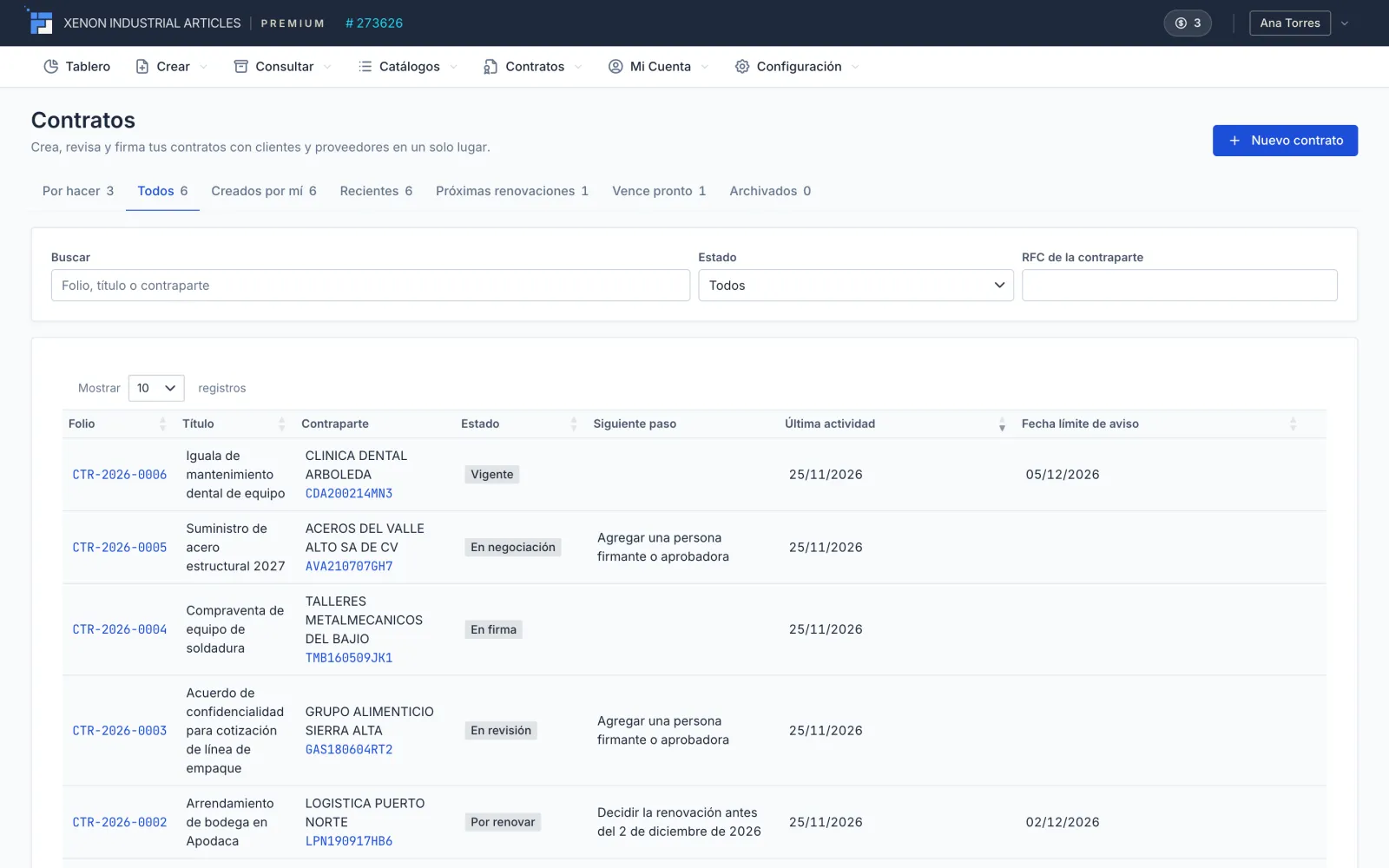
Each contract shows its status, next step and notice deadline.
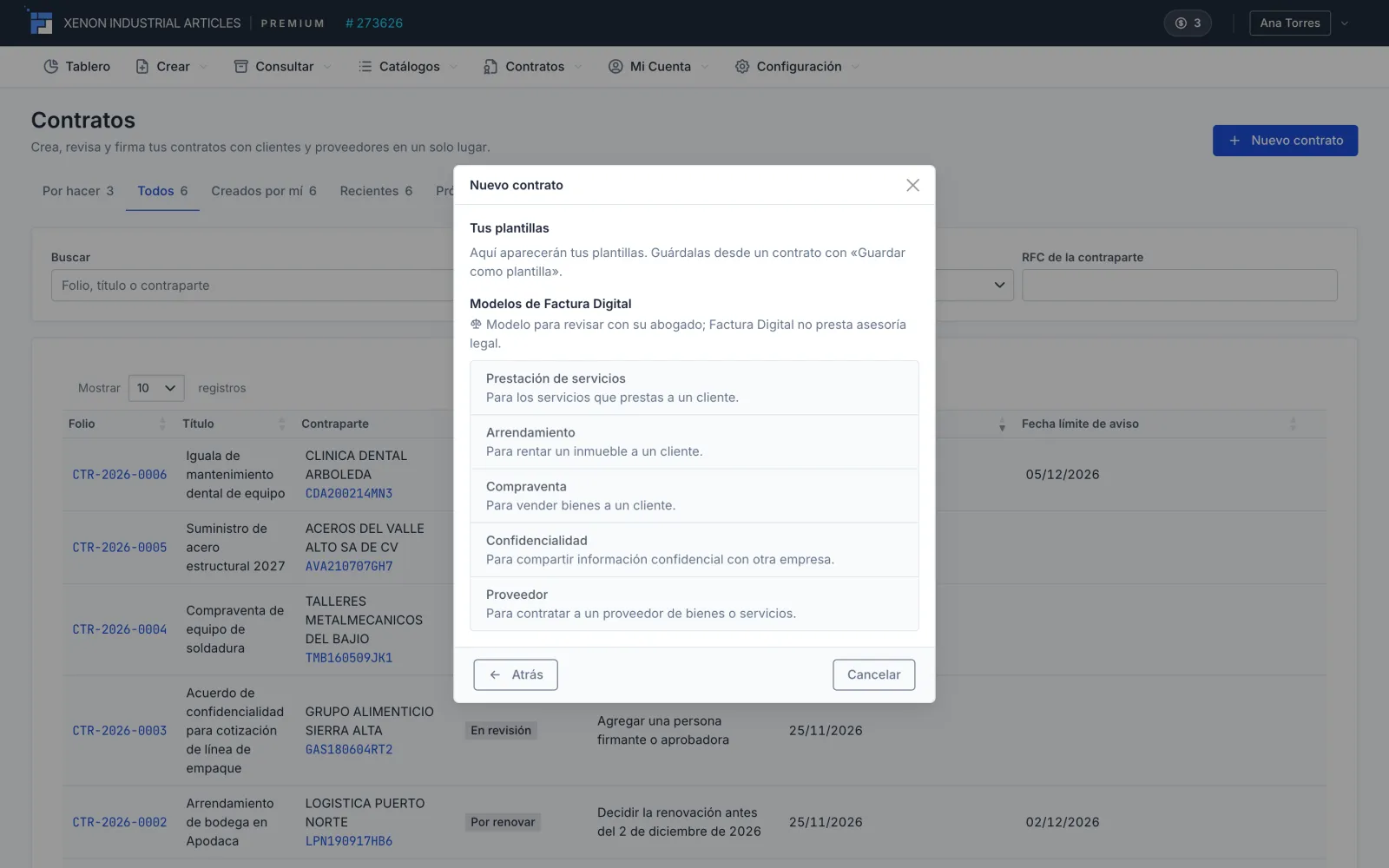
Services, lease, purchase and sale, confidentiality or supplier. Pick the counterparty from your customers or suppliers.
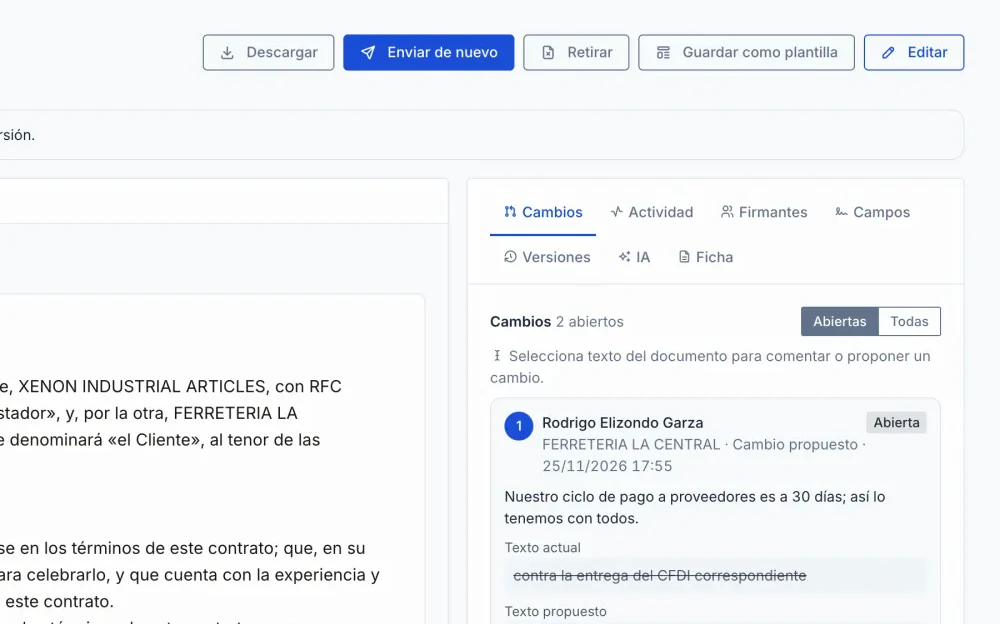
Every comment and proposed change is anchored to the text. Accept and apply creates a new version of the contract.
Removals in red and additions in green, with the version number and who created it.
The version is frozen with its fields. Each signer gets their own link by email, valid for 30 days.
The signer draws or types their signature, accepts the Commerce Code statement and confirms with a code sent by email.
They choose their .cer and .key and type their password. The key and the password are only used in their browser.
Activity shows pages read, active time, opens, signatures, IP and browser for each person.
The last page of the PDF: who signed, when, how and from where.
With the footer code or the PDF, public verification tells you whether it matches, when it was signed and who signed.
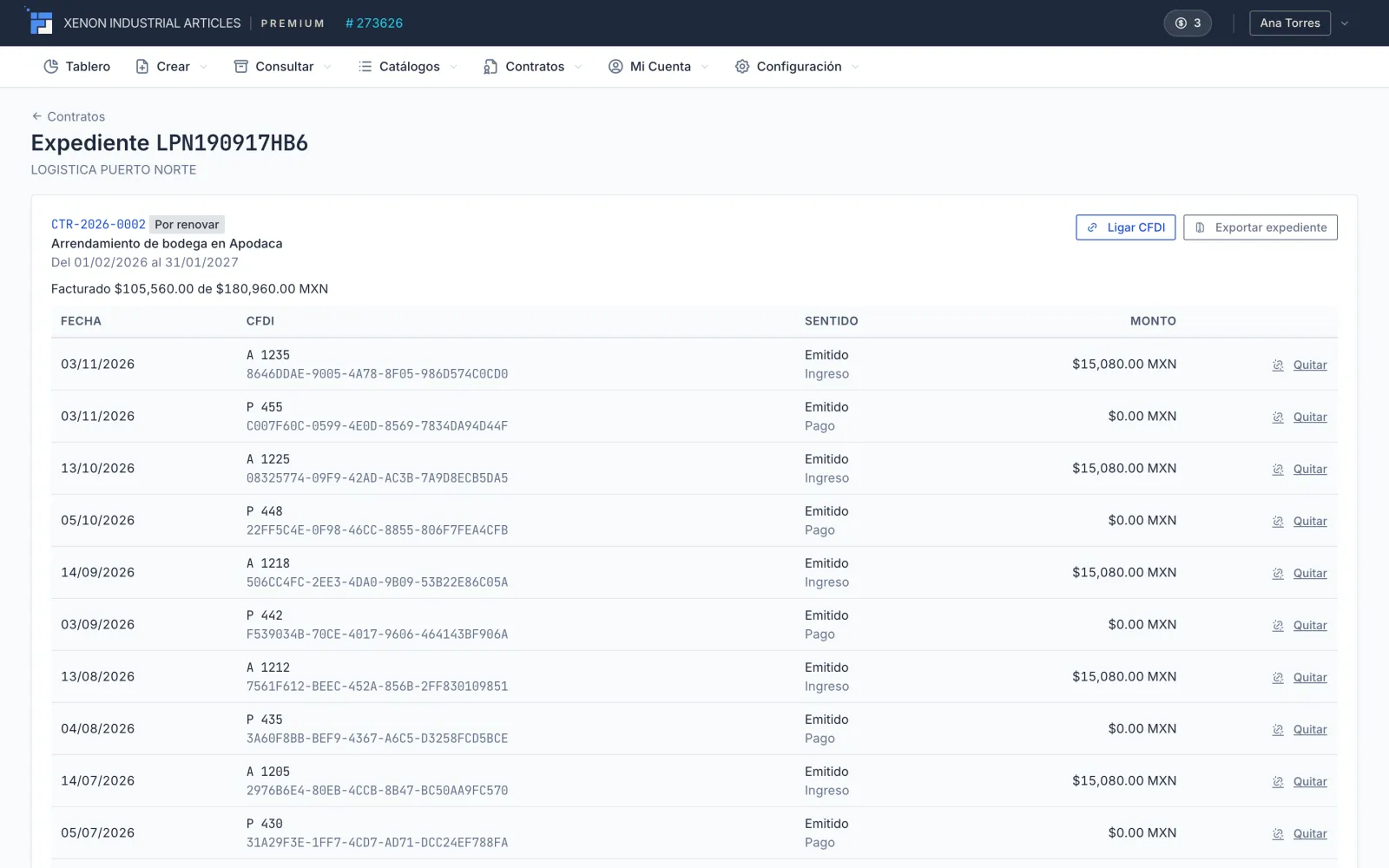
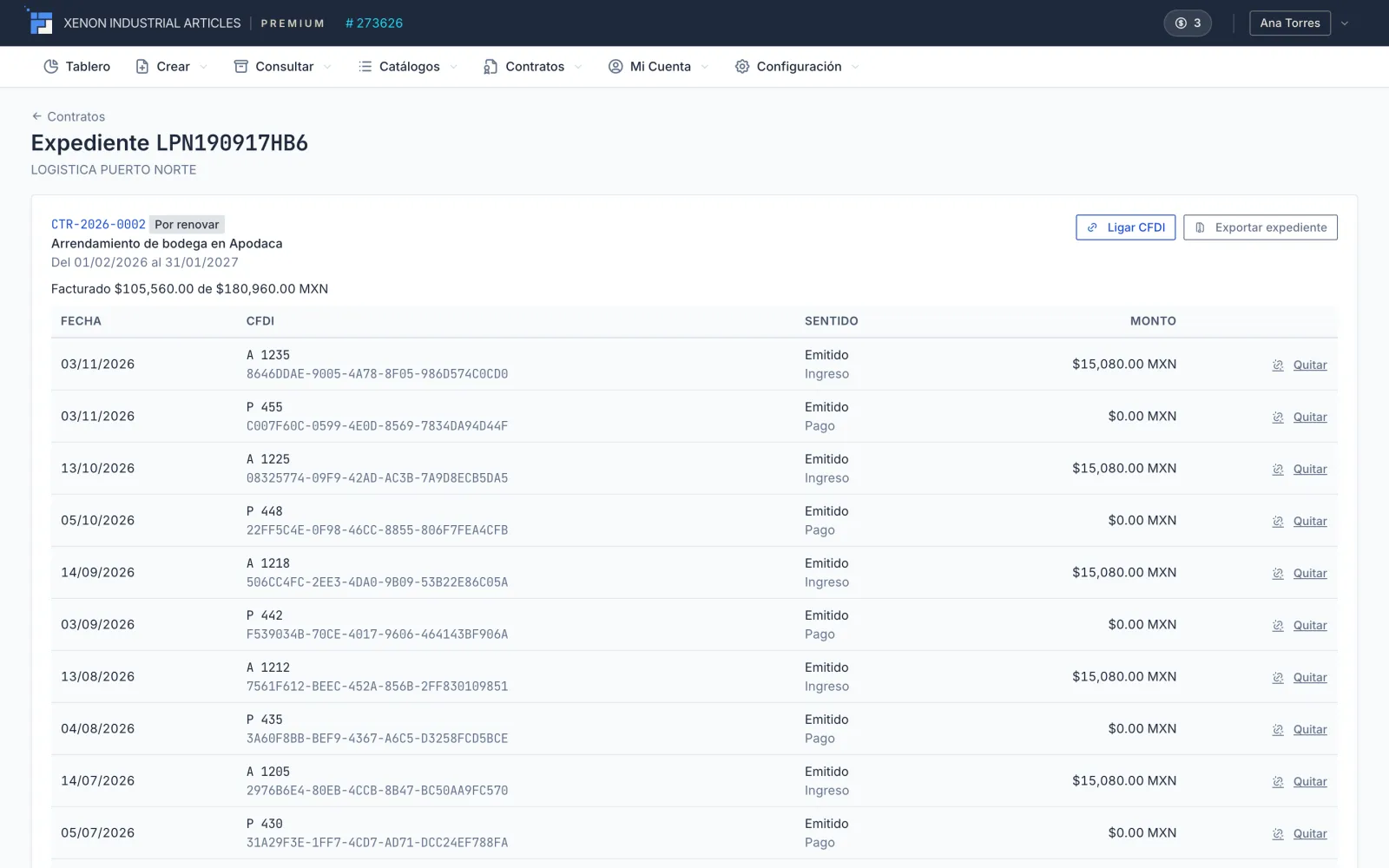
By counterparty RFC: their contracts, linked CFDIs and invoiced versus agreed amount. Exported as a ZIP.
The contract manager, start to finish
A walkthrough of the real screens: create the contract, negotiate it, sign it with e.firma, verify the certificate and build the substance file.
Read the video transcript
A signed contract is only as strong as the evidence behind it. And that evidence is usually scattered across emails, Word files and scanned PDFs.
The Factura Digital contract manager brings it all into the same account you already invoice from.
Start from a template, like a services agreement or a lease, or upload your own PDF. Pick your customer or supplier from the catalog, and their details fill the contract.
Your counterparty gets it by email and enters with a code, no account needed. They comment and propose changes on the same document. You decide what to accept, and every version is saved with its digital fingerprint.
When everyone agrees, it goes out for signature. It can be signed with a simple e-signature, confirmed with an emailed code, or with the SAT e.firma, validated with the SAT. The private key never leaves the signer's device.
When the last person signs, everyone gets the contract with its certificate page: who signed, when, with which method, from which browser and IP address, the document hash and a QR code. Anyone can verify it online.
And most important: every contract is linked to that counterparty's invoices. Your file brings together the signed contract, its log and its CFDIs, ready for your accountant and to support the substance of your transactions before the SAT.
Leases, services, suppliers, confidentiality agreements. The system reminds you before each renewal, so you decide in time.
Contract manager. Included in Premium, with unlimited contracts. Factura Digital.
How it works, from the first draft to the renewal
The whole contract cycle happens in the same account and is recorded in its activity log.
- 01
Create or upload the contract
Start from a template (services, lease, purchase and sale, confidentiality or supplier), write in the editor or upload your PDF. Pick the counterparty from your customers or suppliers and their details fill the contract.
- 02
Add the people and send
Each person has a role: signer, approver, reader or copy. They get their own link by email and enter with a 6-digit code, without creating an account.
- 03
Negotiate on the same document
The counterparty comments or proposes changes on the text. You accept or reject each proposal; accepting creates a new version and you can compare any two versions.
- 04
Send for signature
The version is frozen. You place each signer's signature, initials, name, date or title fields and choose whether they sign at the same time or in order.
- 05
Sign with a simple e-signature or e.firma
The simple signature is drawn or typed and confirmed with an emailed code. The e.firma is used in the signer's browser and the system validates it with the SAT.
- 06
Everyone gets the PDF with its certificate
When the last person signs, everyone receives the contract with the signatures stamped in and the certificate page. Anyone can verify it with its code or its QR.
- 07
Renew on time and build the case file
The system reminds you before the notice deadline, suggests that counterparty's CFDIs for you to link and exports the case file as a ZIP.
Every feature of the contract manager
What the module already does, grouped by contract stage.
Drafting and negotiation
Editor with templates
Five base templates to review with your lawyer, plus your own. Customer name, RFC, address, amount and dates fill in automatically.
PDF contracts
Upload your contract as a PDF of up to 20 MB and 300 pages. You comment page by page, and the PDF keeps its hash.
Versions and comparison
Every change creates an immutable version with its SHA-256 hash. Compare two versions with removals in red and additions in green.
Comments and proposed changes
Threads anchored to the text or to the page. Only you accept or reject; accepting applies the change in a new version.
Summary sheet and risk review
The AI Assistant reads the contract, fills its summary sheet (parties, amount, term, renewal and penalties) and flags each clause green, yellow or red with suggested wording. You confirm; it uses AI credits from your monthly allowance.
Counterparty from your catalog
Find the customer or supplier by name or RFC. If they are not there yet, they are added to your catalog when you create the contract.
Sending and signing
Counterparty inbox
Each person signs in with their email and a 6-digit code and sees every contract they were invited to. If they have a Factura Digital account, they also see them under Received.
Read tracking
You know who opened the contract, when, and which pages they read, with the active time on each one.
Signers and signing order
Several signers and approvers per side, at the same time or in order. Fields per signer: signature, initials, name, date, title, text and checkbox.
Simple e-signature
Drawn or typed and confirmed with an emailed code. It records the date and time, IP, browser and the hash of the signed version.
SAT e.firma signature
Signed in the browser: the private key and password never leave the device. The system checks the SAT chain, validity, that it is an e.firma and not a CSD, revocation and the expected RFC.
Signer reminders
After 3, 7 and 14 days without a response, during business hours. They can be turned off per contract.
After signing
Public verification
With the code or the PDF, the verification page tells you whether it matches a signed contract, when and by whom.
Inbox with seven views
To do, All, Created by me, Recent, Upcoming renewals, Ending soon and Archived.
Renewals and notices
Reminders 90, 60, 30 and 7 days before the notice deadline, and on the expiration day. Renew with an INPC adjustment, send the non-renewal notice or end the contract.
Case file with linked CFDIs
By counterparty RFC: their contracts plus the linked invoices, credit notes and payment complements, with invoiced versus agreed amount.
Export the case file
A ZIP with the signed contract, the certificate page, the activity log as CSV and the XML and PDF of each linked CFDI.
Per-user permissions
Each user in your account gets their own permission: view contracts or manage them.
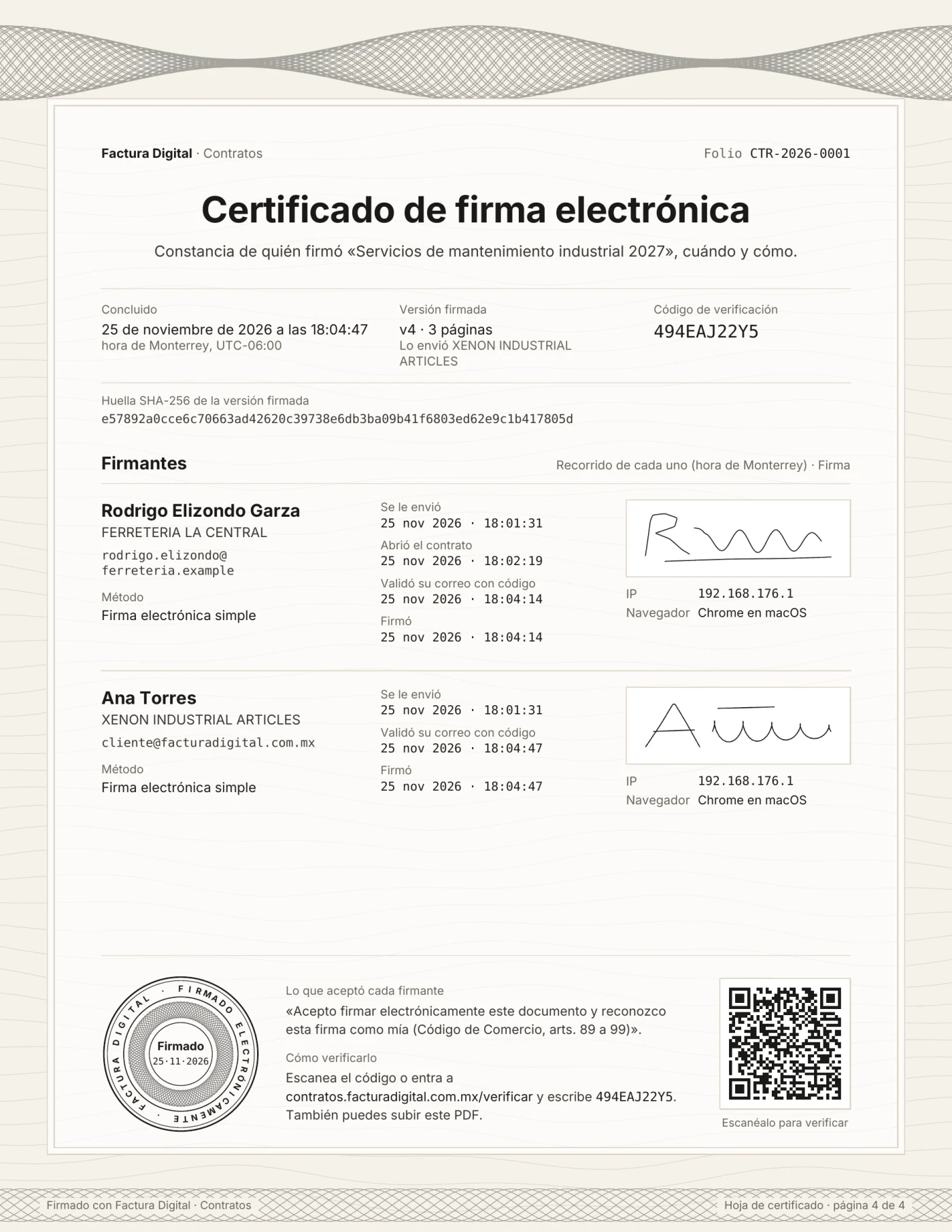
The certificate that comes with every signed contract
The last page of the signed PDF records who signed, when and how. It gives the recipient confidence in the document and leaves you a record to check later.
- Folio and SHA-256 hash
- The hash identifies the exact version that was signed. If anyone changes a comma, the hash no longer matches.
- Verification code and QR
- The 10-character code is in the footer of every page. The QR opens public verification with the code already filled in.
- Each signer's trail
- When it was sent, when they opened the contract, when they validated their email with a code and when they signed, in Monterrey time.
- Method, IP and browser
- Simple e-signature or e.firma, from which IP and with which browser. With e.firma, also the RFC, the certificate serial number and the SAT revocation check.
- Each person's signature
- The drawn signature appears in its box. With e.firma, the box says so and the signature's .p7s file is attached to the PDF.
- What each signer accepted
- The text they accepted when signing, citing the Commerce Code.
Substance (materialidad): the contract, its CFDIs and its log in one case file
Materialidad is the evidence that a transaction backed by a CFDI really happened: the service was rendered, the goods were delivered and it was paid. The SAT reviews it mainly under article 69-B of the Federal Tax Code, which presumes that transactions are nonexistent when the issuer lacks the assets, staff or infrastructure to carry them out, and under article 5-A, which requires a business reason.
A CFDI alone does not prove the transaction existed. It goes together with a contract, deliverables, communications and payments. The contract manager gathers the documentary part in one file per customer or supplier:
- The signed contract with its certificate page: who signed, when, with which method and on which version.
- The full log: sends, opens, reading per page, comments, accepted changes and signatures.
- That counterparty's CFDIs linked to the contract, issued or received, with invoiced versus agreed amount.
- The file as a ZIP for your accountant or for a SAT request.
The contract manager organizes and stores the evidence; it does not replace the transaction. Deliverables, reports and payments remain your main support. For a specific case, ask your accountant or lawyer.
What the case file ZIP contains
- final.pdf
- The signed contract, with signatures stamped in
- certificado.pdf
- The certificate page
- bitacora.csv
- Every contract event, with date, person, IP and browser
- cfdi/<uuid>.xml and .pdf
- Each linked CFDI, issued or received
What companies use it for
Leasing a store or an office
An annual lease with renewal and INPC adjustment. You link each month's rent receipts to the contract and the system reminds you before the notice deadline.
Professional services and retainers
The services agreement and its monthly invoices in the same file, with invoiced versus agreed amount.
Supplier onboarding
Supplier and confidentiality agreements signed before the first order. Their received CFDIs are linked to support the substance of your deductions.
Confidentiality before quoting
An NDA the other party reviews and signs from their email, without creating an account.
Purchase and sale, large orders
Delivery, payment and penalty terms signed by both parties' representatives, in the order you choose.
Customers on annual contracts
Contracts renewed by copying people and terms, or ended with their non-renewal notice and acknowledgment of receipt.
Versus email and a separate signing platform
What changes when the contract lives next to your invoicing.
| PDF by email | Separate signing platform | Factura Digital | |
|---|---|---|---|
| Signing with the SAT e.firma, validated with the SAT | No | Depends on the provider | Yes |
| SHA-256 hash and public verification | No | Yes | Yes |
| Comments and versions on the same document | No | Depends on the provider | Yes |
| Counterparty CFDIs linked to the contract | No | No | Yes |
| Exportable substance case file | No | No | Yes |
| Reminders by renewal notice deadline | No | Depends on the provider | Yes |
| Cost for the signer | None | None | None |
| Cost for you | None | Separate subscription | Included in Premium |
General comparison. Each platform's features change; confirm them with each provider.
Contract manager FAQ
If your question is not here, write to us and a person will answer.
Talk to salesWhat is the Factura Digital contract manager?
It is a platform module to create, send, negotiate, sign and renew contracts with customers and suppliers. Contracts are signed with a simple e-signature or with the SAT e.firma. Every signed contract includes a verifiable certificate page and sits next to that counterparty's CFDIs.
Is an electronically signed contract valid in Mexico?
Yes. The Commerce Code recognizes data messages and electronic signatures in commercial acts (articles 89 to 114), and the Federal Civil Code accepts electronic means when the law requires written form, as long as the information can be attributed to the parties and consulted later (article 1834 bis). Some acts require special formalities, such as a notarial deed; for those, ask your lawyer.
What is the difference between a simple e-signature and the e.firma?
The simple signature is drawn or typed and confirmed with a code sent to the signer's email; the system records the date, IP, browser and the document hash. The e.firma is the advanced electronic signature issued by the SAT: the system checks that the certificate comes from the SAT, is valid, is not revoked and matches the expected RFC.
How do you sign a contract with the SAT e.firma?
The signer opens the contract from their link, picks their certificate (.cer) and private key (.key) and types their password. The signature is generated in their browser, without sending the key or the password, and the system validates with the SAT that it is an e.firma, is current, is not revoked and matches the expected RFC.
Is my e.firma uploaded to the server?
No. The private key (.key) and the password are only used in the signer's browser. The server receives the generated signature and the public certificate (.cer), which is what gets validated with the SAT.
Does the other party need a Factura Digital account or to pay anything?
No. They get a personal link by email, confirm their identity with a 6-digit code and can read, comment, propose changes, accept, reject and sign without creating an account or paying.
How is a signed contract verified?
Every page of the signed PDF carries a 10-character verification code and the certificate page has a QR. On the public verification page you enter the code or upload the PDF, and it tells you whether it matches a signed contract, with its folio, the date and who signed, without showing emails or IP addresses.
How much does the contract manager cost?
It is included in Premium, which costs $450 MXN per month or $4,500 MXN per year with VAT included, with unlimited contracts and sends. AI Assistant features, such as the summary sheet and the risk review, use AI credits from your monthly allowance. Accounts without Premium can receive and sign contracts.
Can I upload my own contracts?
Yes. You can upload your contract as a PDF of up to 20 MB and 300 pages, or write it in the editor from a base template or your own templates.
Does it remind me when to renew a contract?
Yes. With the end date and the notice days on the summary sheet, the system calculates the notice deadline and writes to you 90, 60, 30 and 7 days before, and on the expiration day. From there you renew, send the non-renewal notice or end the contract.
Does it help with substance (materialidad) for SAT reviews?
It helps you gather and keep the documentary evidence: the signed contract with its certificate, the log and the linked CFDIs, exportable as a ZIP. It does not replace the evidence of the transaction itself (deliverables, reports and payments) nor guarantee the outcome of a review.
What happens to my contracts if I cancel Premium?
They stay in your account so you can view and download them. What you already sent can still be signed; to create or send new contracts you reactivate Premium.
Keep reading
Sign your next contract where you already invoice
Create your account with no card and activate Premium to send your first contract. Signers pay nothing.