What bank reconciliation is and what Payments and collections does
Bank reconciliation means matching the movements on your bank statement with your invoices and recorded payments, to know which invoice each deposit paid and which supplier invoice each charge settled.
Payments and collections is a Factura Digital module that brings together, on one screen, what your customers owe you, what you owe your suppliers and what happened in your bank. It has three tabs: Receivables, Payables and Reconciliation.
Your bank statement already says who paid you and whom you paid. The system reads it, matches it with your invoices and proposes what goes with what, with its reasons. You confirm and, when it is the collection of a credit invoice, the payment complement is stamped in the same step.
The problem: the deposit arrives, the invoice never finds out
In most companies, money comes in by transfer and the invoice is marked as paid days or weeks later, if someone remembers. Meanwhile, receivables say you are owed what you already collected, payment reminders go to people who already paid and the payment complement is stamped late.
When you collect an invoice issued with the PPD payment method (installments or deferred), the SAT requires a payment complement, or REP, for each payment received. The Resolución Miscelánea Fiscal sets the deadline: no later than the fifth calendar day of the month after the one in which you received the payment.
The slow part is working out, among dozens of transfers, which invoice each one paid. Payments and collections proposes it, with its reasons.
Walk through the module, screen by screen
This walkthrough uses real app screens with sample data; the interface is in Spanish. Use the arrows or let it play.
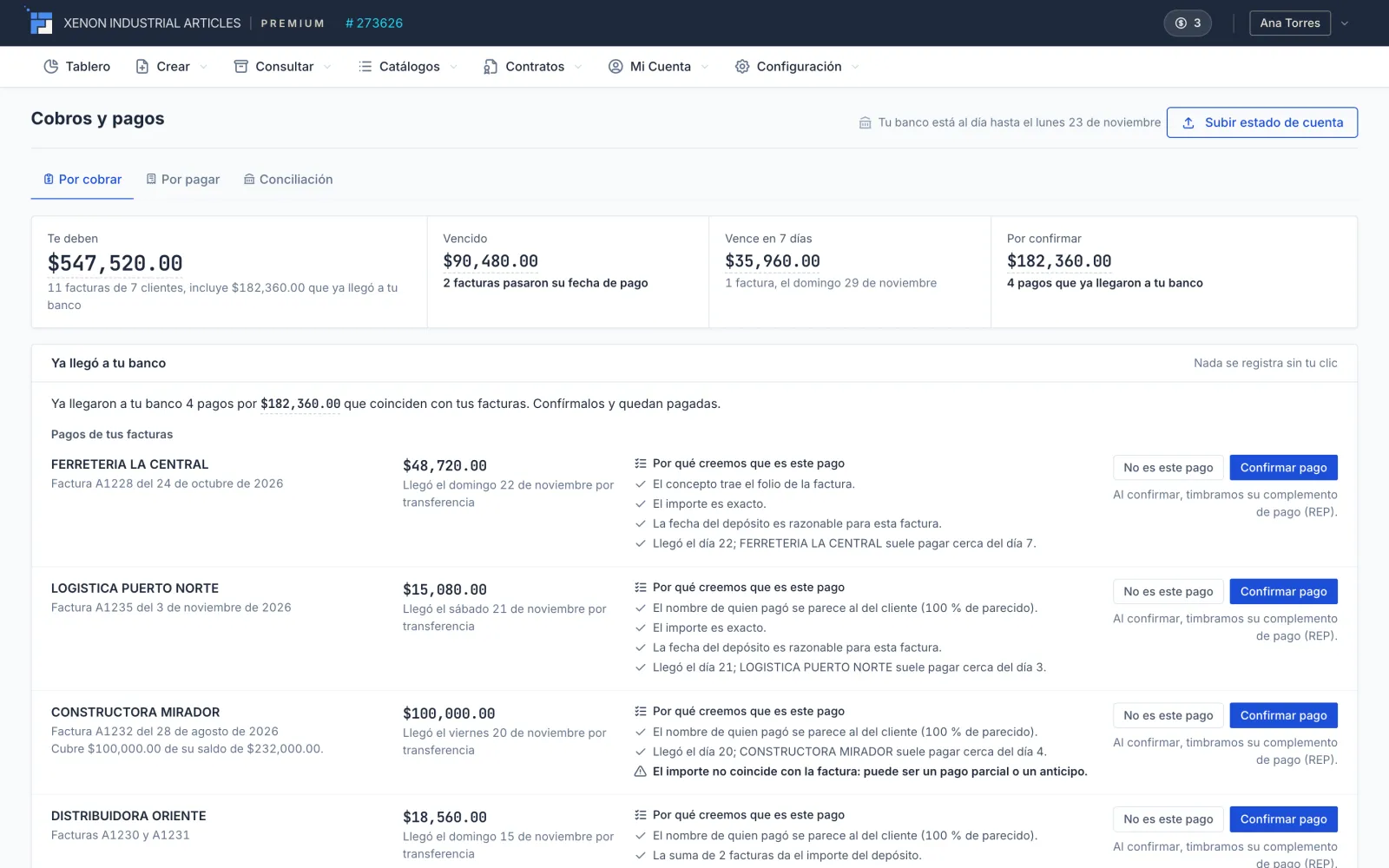
Owed to you, overdue, due in 7 days and payments already in your bank waiting to be confirmed. Only credit invoices (PPD) count.
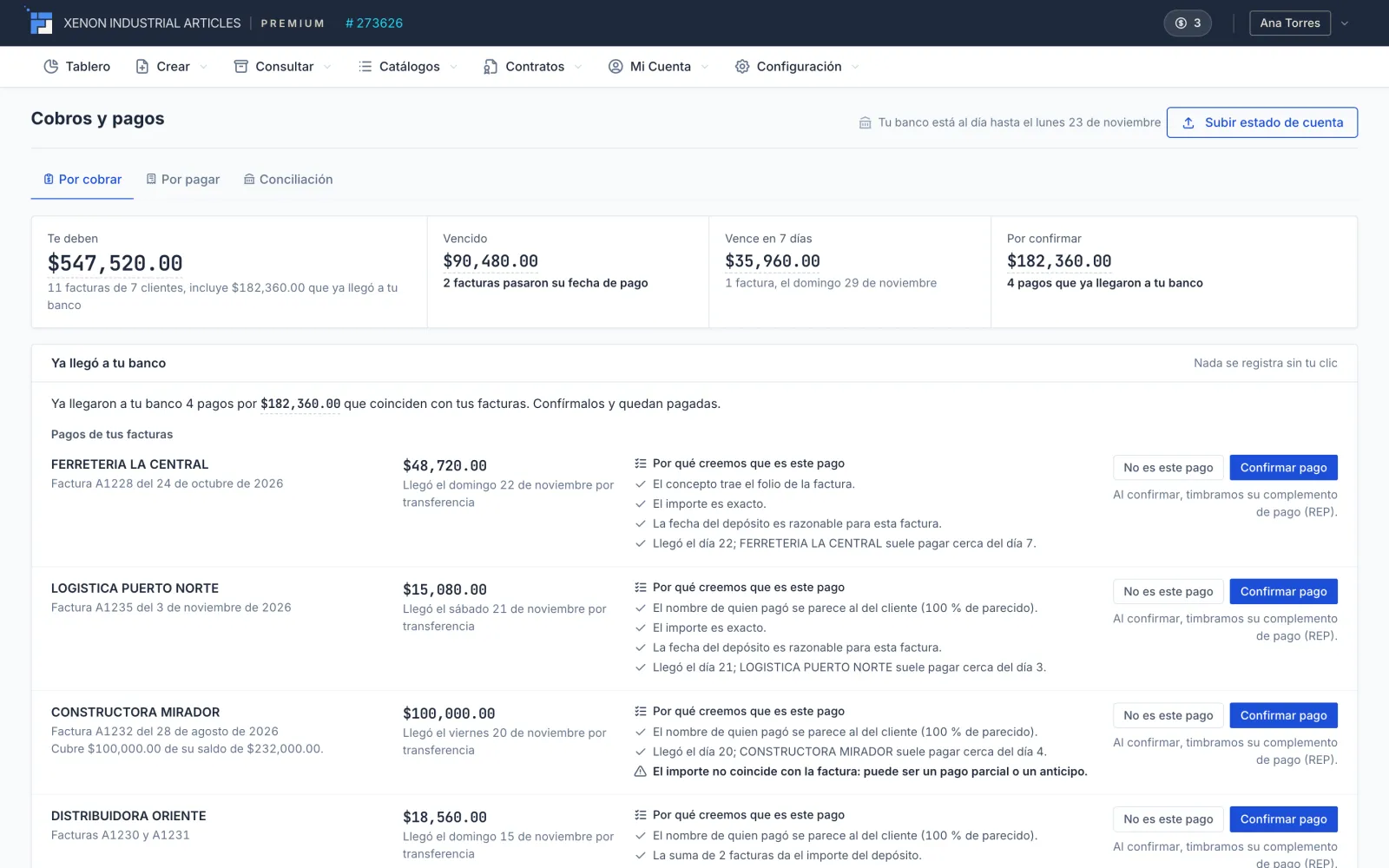
Each deposit comes with the invoice it pays and its signals: the folio in the reference, the exact amount, the payer's name and the day that customer usually pays.
"Confirmar pago" (Confirm payment) opens a window with the previous balance, this payment and what remains. You check the payment method and transaction number, and "Confirmar y timbrar" (Confirm and stamp) records the payment and sends its REP to your customer.
When you confirm, the invoice is paid and its payment complement is stamped and sent to your customer. The confirmation message shows the series and folio of each one.
Their open invoices, their latest payments with complements and their habit: how many days they take and around which day of the month. That drives when you expect to collect.
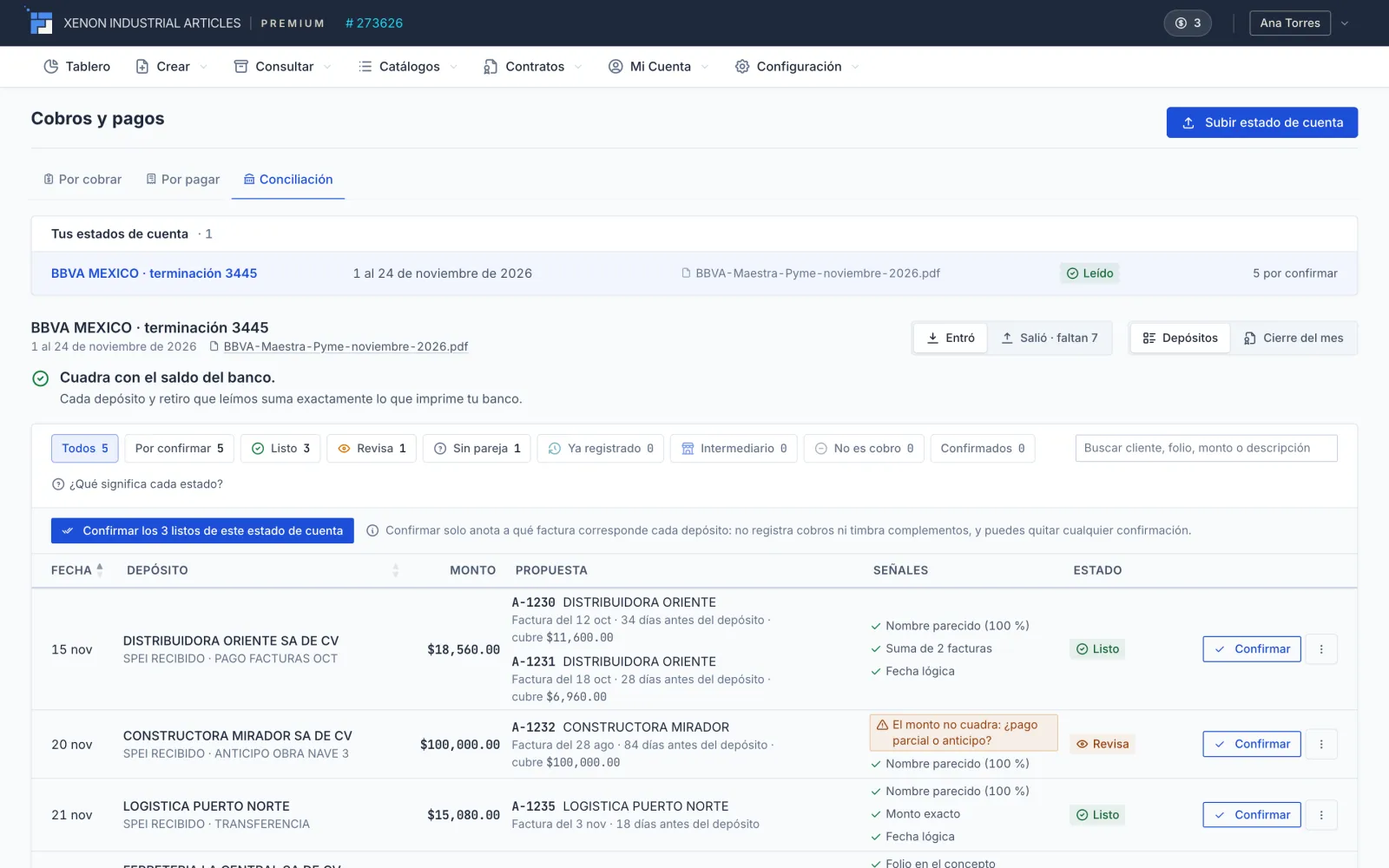
The statement is read and checked against the bank balance. Each deposit is Ready, Review or Unmatched, and the ready ones are confirmed in bulk.
The month's reconciliation schedule with what is left to close it. One person prepares it, another reviews it, and the Excel file is ready for your accountant.
Each charge with its supplier or its explanation. If the system does not know an account, it asks whose it is: a supplier, someone paying on behalf of the company or another account of yours, and remembers it.
Owed, overdue, due this week and payments still missing their complement. Upcoming payments by date and how long you usually take to pay each supplier.
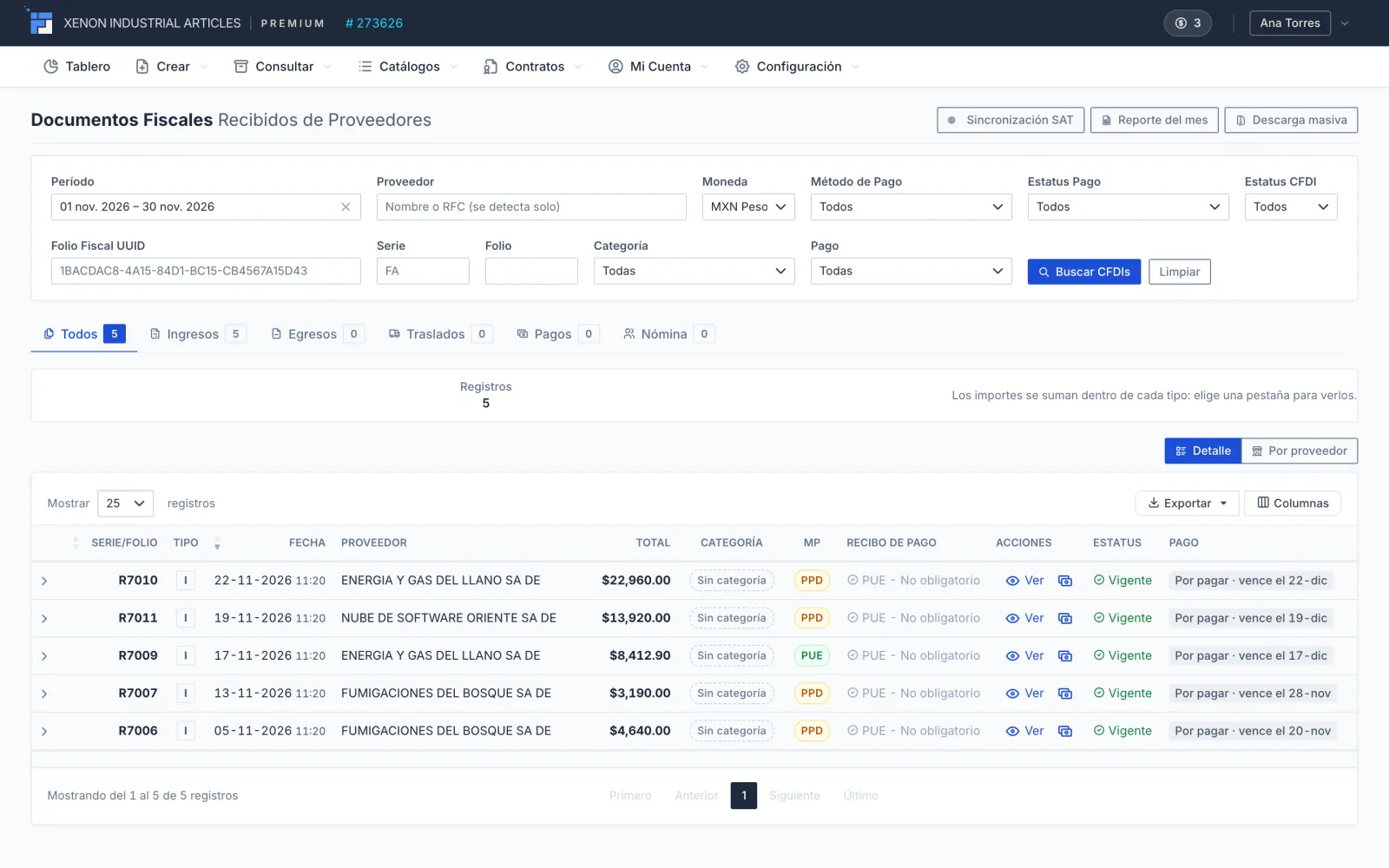
Your received invoices show the Payment column: paid on…, to pay and its due date, or paid outside the bank. Its filter shows what is still to pay.
Step 1. Upload your bank statement
From "Subir estado de cuenta" (Upload bank statement) you choose your bank's file: PDF, Excel (XLSX or XLS), CSV or TXT, up to 20 MB and 80 pages. If the PDF is password protected, the system asks you to download it without one.
The system extracts every deposit and charge and, before proposing anything, checks that they add up exactly to the balance your bank prints. On screen it says so: "Cuadra con el saldo del banco" (Matches the bank balance). Formats the system already knows are read at no cost; a new format or a scanned PDF uses 1 credit from your account.
Step 2. Review what the system proposes and why
For each deposit the system looks for the issued invoice it pays, and for each charge, the supplier invoice it settles. Each proposal comes with its signals, so you know why:
- The invoice RFC or folio appears in the transfer reference.
- The amount matches exactly, or matches the sum of several invoices from the same customer.
- The payer's name resembles the customer's.
- The source account was already confirmed for that customer.
- The date is reasonable for that invoice and matches the customer's payment habit.
| Status | What it means |
|---|---|
| Ready | The signals match; it can be confirmed, also in bulk |
| Review | There is a proposal but something does not add up (for example, a partial payment) |
| Unmatched | No invoice was found; it may be a sale without an invoice or not a collection |
| Already recorded | The payment already exists with its complement; it is only linked |
| Intermediary | Deposit from a payment gateway, with its fee |
| Not a collection | A transfer between accounts or another movement that is not a sale |
Step 3. Confirm the payment and stamp the complement
In Receivables, the "Ya llegó a tu banco" (Already in your bank) section shows deposits that match your invoices. "Confirmar pago" (Confirm payment) opens a window with what the invoice had left, this payment and what remains. It also shows the deposit date, payment method, transaction number, the complement's series and folio and the box to send it to the customer.
With "Confirmar y timbrar" (Confirm and stamp), the system records the payment, stamps the payment complement with the next installment and the remaining balance, and emails it to the customer. If a deposit comes from several customers, it stamps one complement per customer. Even with a double click or a dropped connection, each payment stamps a single complement.
Receivables: who owes you and when you expect to collect
The Receivables tab starts with four figures: what you are owed, what is overdue, what is due in 7 days and payments already in your bank waiting to be confirmed. Only credit invoices (PPD) count; cash sales are separate.
Below are the "Cuándo esperas cobrar" (When you expect to collect) forecast by week and half-month, the aging of what you are owed (from current to over 90 days) and "Quién te debe" (Who owes you), which starts with what needs attention: who passed their due date and who is later than usual.
How each customer pays you
Each customer has a sheet: open invoices, latest payments with their complement and payment habit. The system works out how many days they usually take, around which day of the month, whether they group invoices and whether they include the folio, from their past payments. That drives the collection forecast.
Payables and what leaves your bank
The Payables tab shows what you owe suppliers, what is overdue, what is due this week and payments missing their complement. Upcoming payments are sorted by date, and per supplier you see how long you usually take to pay them.
In reconciliation, the outgoing side links each charge to the supplier invoice it settles: partial payments, several invoices, US dollars and advances. If the system does not know an account, it asks whose it is: a supplier, someone paying on behalf of the company (for reimbursements) or another account of yours. It remembers next time.
Your received CFDIs also show the Payment column: paid on…, partially paid, to pay with its due date, paid outside the bank or paid per its complement.
Hard cases already handled
- Partial payments: the complement carries the installment number and the remaining balance.
- One deposit paying several invoices, in a single complement.
- One deposit from several customers: one complement per customer.
- Payment gateways (PayPal, Clip, Mercado Pago, Stripe and bank terminals): recognized, with their fee accounted for.
- Invoices in another currency: reconciliation matches them using the DOF exchange rate; their payment is recorded from Issued.
- Deposits without an invoice: marked "No es una venta" (Not a sale) or open "Crear factura" (Create invoice) with the customer selected.
- Payments already recorded with their complement: linked without duplicating.
- Undo: remove a confirmation or reopen the month.
Month-end close for your accountant
Each month has its reconciliation schedule: opening and closing balance per the bank, deposits, withdrawals, reconciling items and what is left to close. One person prepares the close, another reviews it, and it can be reopened. The Excel file for your accountant has a summary, deposits, reconciling items and aging.
Control and permissions
The module's rule is that nothing settles itself. Confirming in Reconciliation only notes which invoice a deposit belongs to; the payment is recorded and the complement stamped only when a person presses "Confirmar y timbrar" (Confirm and stamp).
- View Receivables and reconciliation.
- Upload statements and confirm matches.
- Confirm payments and stamp their complements.
- Edit when each customer pays.
- See what you owe suppliers.
- Confirm supplier payments.
How much it costs
Your account includes 1 reconciled statement per month. With Premium, which costs $450 MXN per month or $4,500 MXN per year with VAT included, there is no limit. Each payment complement uses stamps from your account, like any CFDI; stamps never expire.
How to get started
- Create your account with 10 free stamps, no card, or sign in to yours.
- Download this month's statement from your online banking as PDF, Excel, CSV or TXT.
- Go to Payments and collections and press "Subir estado de cuenta" (Upload bank statement).
- Confirm what came out Ready and review the rest. See every feature on the Payments and collections page.